
Touchscreen glass selection is the process of matching cover glass type, thickness, surface coating, and touch technology compatibility to the specific performance demands of a device or system. Get it wrong and you face degraded touch sensitivity, failed impact tests, or costly firmware rework. Cover glass is a critical engineering component that directly governs durability, optical clarity, and long-term reliability. This guide gives engineers and procurement professionals a structured framework for choosing touchscreen glass across consumer, industrial, rugged, and extreme applications. Standards such as IEC 62262 IK ratings, 6H pencil hardness, and optical transparency thresholds are the benchmarks that drive every decision here.
What are the main types of touchscreen glass?
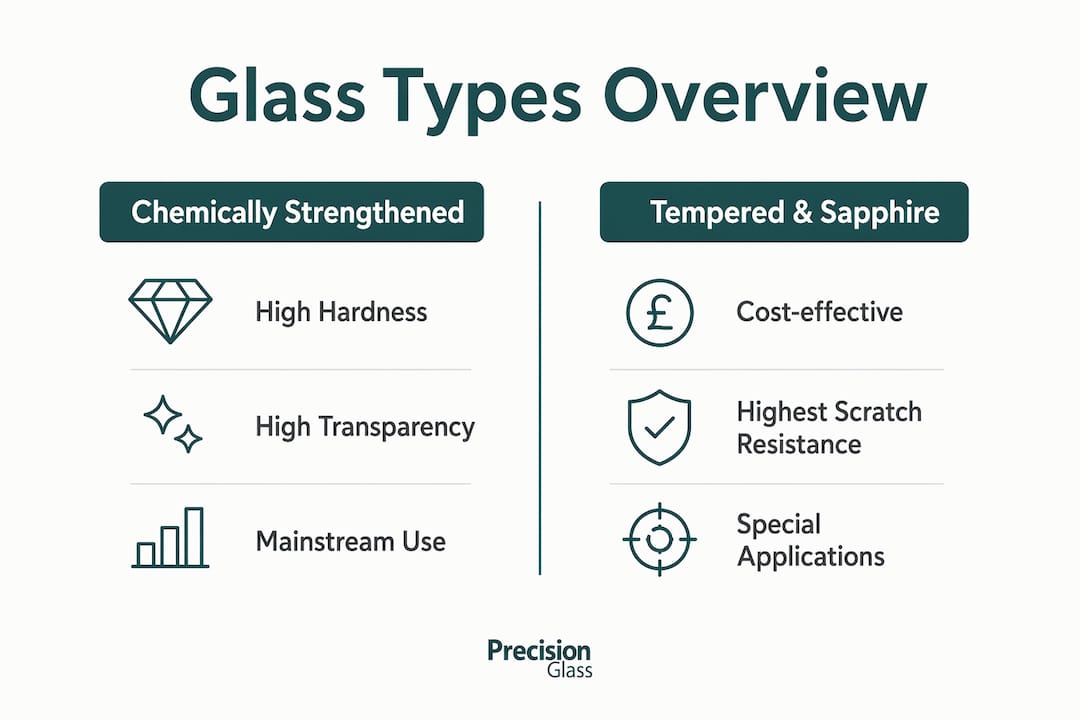
Chemically strengthened aluminosilicate glass is the dominant material for touchscreen cover glass. Ion exchange processing compresses the surface layer, producing a glass that resists scratching and impact far better than standard soda-lime alternatives. It is the default choice for consumer electronics and most industrial panels.
Tempered glass offers a lower-cost route to surface hardness. It is produced by thermal treatment rather than chemical exchange, which limits the achievable thinness and makes it less suitable for projected capacitive (PCAP) touch applications requiring sub-millimetre sheets. Laminated glass, where two or more plies are bonded with an interlayer, adds structural integrity and is common in automotive dashboards and defence displays where fragment retention matters.

Sapphire composites sit at the top of the durability hierarchy. Sapphire rates 9 on the Mohs scale compared to roughly 6–7 for aluminosilicate glass. The trade-off is cost and weight: sapphire is significantly more expensive and heavier, which restricts its use to high-value applications such as military wearables or medical instruments where scratch resistance is non-negotiable.
Premium glass standards require a minimum of 92% optical transparency and 6H pencil hardness. These two figures are the baseline specification for any glass entering a professional display application. Falling below 92% transparency introduces visible colour shift and reduces display contrast under ambient light.
The table below summarises the key performance characteristics across the main glass categories.
| Glass type | Typical hardness | Optical transparency | Best suited for |
|---|---|---|---|
| Chemically strengthened aluminosilicate | 6H–7H | 92%+ | Consumer, industrial, medical |
| Tempered soda-lime | 5H–6H | 90%–92% | Low-cost industrial panels |
| Laminated glass | Variable | 88%–92% | Automotive, defence, safety-critical |
| Sapphire composite | 9H | 85%–92% | High-value rugged, military, medical |
Capacitive touch requires a non-conductive, thin glass that allows the electric field to pass through to the sensor layer beneath. Resistive touch is less sensitive to material composition and tolerates thicker, denser glass because it relies on physical pressure rather than field detection. Selecting the wrong glass family for your touch technology is the most common and most expensive specification error in this category. You can read more about the glass vs plastic trade-off for touch applications if your project brief is still open on that question.
How to determine the optimal glass thickness for your project
Start with the IK rating, not the thickness. Engineers should define the IK rating first under IEC 62262, then derive the glass thickness and structural design from that impact resistance requirement. Starting with a preferred thickness and working backwards produces over-engineered assemblies that frequently fail touch sensitivity tests.
The four standard thickness bands map directly to application category:
- Consumer devices (0.4–1.1 mm): Smartphones, tablets, and thin-panel consumer electronics. Prioritises weight and touch sensitivity over impact resistance.
- Industrial panels (1.0–2.0 mm): Factory HMIs, logistics terminals, and point-of-sale systems. Balances durability with PCAP compatibility.
- Rugged applications (2.0–6.0 mm): Field equipment, outdoor kiosks, and vehicle-mounted displays. Requires validated controller tuning.
- Extreme rugged environments (4.0–15.0 mm): Defence consoles, subsea equipment, and heavy industrial machinery. Custom firmware is almost always necessary.
These thickness ranges are the accepted industry standard for matching cover glass to application category. Deviating from them without a validated reason adds risk without benefit.
The interaction between thickness and PCAP touch controllers is where most procurement errors occur. PCAP glass typically ranges from 0.55 to 1.8 mm, and the controller must be validated for the chosen thickness to maintain accurate touch detection. Beyond that window, the electric field attenuates and touch accuracy degrades. Standard PCAP controllers struggle beyond 4–6 mm without custom firmware development. That custom development adds cost and extends your programme timeline.
Pro Tip: Request the controller manufacturer’s glass thickness validation data before finalising your specification. If they cannot provide it for your target thickness, budget for firmware tuning from the outset.
Over-specifying glass thickness degrades capacitive touch response and requires costly custom firmware tuning. The practical consequence is longer development cycles and higher unit costs. Thickness is not a proxy for quality. Match it to the IK rating and the touch technology, then stop.
For a detailed walkthrough of the glass selection process for electronics, Precision Glasses provides application-specific guidance covering thickness, material, and controller compatibility.
What surface coatings enhance touchscreen glass usability?
Surface coatings such as Anti-Glare, Anti-Reflective, and Anti-Fingerprint are engineering requirements for outdoor and industrial applications, not cosmetic additions. Specifying them late in the design process forces costly tooling changes and can invalidate optical performance testing already completed.
The three primary functional coatings each address a distinct operational problem:
- Anti-Glare (AG): Etches or deposits a micro-texture on the glass surface to scatter incident light. Reduces specular reflection in high-ambient-light environments such as outdoor kiosks and vehicle dashboards. The trade-off is a slight reduction in image sharpness, which becomes noticeable at high display resolutions.
- Anti-Reflective (AR): Applies thin-film interference layers to suppress reflection across the visible spectrum. Improves contrast and colour accuracy without the sharpness penalty of AG. AR coatings are more fragile than AG and require careful specification for environments with chemical exposure or abrasive cleaning.
- Anti-Fingerprint (AF): Deposits a fluoropolymer layer that reduces oleophilic adhesion. Maintenance cost drops significantly in public-facing or medical applications where frequent cleaning is required. AF coatings are typically applied over AR to combine both benefits.
Antimicrobial coatings, incorporating silver-ion or copper-based compounds, are increasingly specified for medical devices and public terminals. They reduce surface bacterial load between cleaning cycles. These coatings must be validated against the cleaning agents used in the target environment, as some disinfectants degrade the antimicrobial layer.
Chemical resistance and abrasion resistance are separate specifications from optical coatings. A glass that carries an AR coating may still fail in an environment with solvent exposure unless the base glass and coating stack are both rated for that chemistry. Always test the complete assembly, not the glass substrate alone.
Pro Tip: Specify coatings before finalising the optical stack. Retrofitting an AR or AG coating after display integration testing frequently requires repeating luminance and contrast measurements.
Optical clarity standards for touchscreen glass, including how coatings affect transparency measurements, are covered in detail in Precision Glasses’ engineering reference.
How does touch technology govern glass material and thickness?
Touch technology choice is the determining factor for glass thickness and material selection. Capacitive and resistive technologies impose fundamentally different constraints, and confusing them at the specification stage creates integration problems that are difficult to resolve without redesign.
The alignment process between touch technology and glass specification follows this sequence:
- Define the touch technology. Confirm whether the application requires PCAP, surface capacitive, resistive, or infrared touch. Each has distinct glass property requirements.
- Set the glass material. Capacitive touch requires thin, non-conductive glass. Resistive touch tolerates thicker glass because pressure deflection, not field transmission, drives detection.
- Confirm the thickness window. For PCAP, stay within the 0.55–1.8 mm validated range unless you have confirmed controller support for a wider window.
- Validate with the controller supplier. Obtain written confirmation that the controller firmware supports the specified glass thickness and material. Do not rely on nominal specifications alone.
- Prototype and test before committing to production volumes. Touch accuracy, palm rejection, and glove operability all vary with glass thickness and coating combination. Test the full assembly under operating conditions.
- Document the validated specification. Lock the glass type, thickness, coating stack, and controller firmware version as a controlled configuration. Any change to one parameter requires re-validation of the others.
Mismatches between glass thickness and controller capability produce symptoms that are easy to misdiagnose: intermittent touch drop-outs, reduced multi-touch accuracy, and increased false activations. These faults often appear only under temperature variation or with gloved use, which means they surface late in the development cycle when they are most expensive to fix.
Procurement teams should require a validated 3D design check of the full touch assembly before approving production tooling. This step catches thickness-controller mismatches before they become field failures.
Key takeaways
Selecting the correct touchscreen glass requires matching glass type, IK-derived thickness, functional coatings, and touch controller compatibility as a single integrated specification, not four independent decisions.
| Point | Details |
|---|---|
| Start with IK rating | Define impact resistance under IEC 62262 first, then derive glass thickness from that requirement. |
| Match thickness to application band | Use 0.4–1.1 mm for consumer, 1.0–2.0 mm for industrial, 2.0–6.0 mm for rugged, and 4.0–15.0 mm for extreme environments. |
| Validate PCAP controller compatibility | Confirm the controller supports your chosen thickness; standard controllers struggle beyond 4–6 mm without custom firmware. |
| Specify coatings early | AG, AR, and AF coatings affect optical testing outcomes and must be locked before display integration testing begins. |
| Test the full assembly | Touch accuracy, glove operability, and palm rejection vary with the complete glass and controller combination, not the glass alone. |
Why I think most teams get touchscreen glass selection backwards
After working with engineers across defence, medical, and industrial electronics programmes, the pattern I see most often is this: the glass thickness gets chosen first, usually based on a previous project or a supplier’s catalogue default, and everything else gets fitted around it. That approach fails more often than it succeeds.
The IK rating framework exists precisely to prevent this. When you start with the impact resistance requirement and work forward to thickness, you avoid the twin traps of over-specification (which kills touch sensitivity) and under-specification (which fails field testing). I have seen programmes where the glass was 40% thicker than the IK rating required, and the team spent three months tuning firmware to recover touch accuracy they had engineered away.
Coatings are the other area where I see procurement teams consistently underinvest early. An AR coating specified after the optical stack is finalised is not the same product as one designed into the stack from the start. The interference layer thicknesses are tuned to the substrate. Retrofitting costs time and money that could have been avoided with a single early decision.
The most reliable programmes I have observed treat the glass specification as a system-level document: glass type, thickness, coating stack, and controller firmware version are all locked together and re-validated as a unit whenever any one parameter changes. That discipline is not bureaucratic overhead. It is the difference between a clean first-article test and a six-week root-cause investigation.
If your team is still treating glass as a commodity purchase rather than an engineered component, the glass durability trade-offs covered by Precision Glasses are worth reviewing before your next specification review.
— Alexandra
Precision Glasses: engineered glass for demanding touchscreen applications
Precision Glasses supplies precision-engineered cover glass for consumer, industrial, rugged, and extreme applications across defence, aerospace, medical devices, automotive, and electronics sectors.

Whether your project requires chemically strengthened aluminosilicate panels, laminated safety glass for vehicle dashboards, or custom-thickness substrates for PCAP integration, Precision Glasses works with your design and procurement teams from specification through to delivery. Our quality assurance process covers optical transparency, surface hardness, coating performance, and dimensional accuracy to the tolerances your application demands. Explore the full range of engineered glass solutions or review our technical glass products to find the right starting point for your specification. Contact Precision Glasses to discuss your project requirements directly with our engineering team.
FAQ
What is the standard thickness for industrial touchscreen glass?
Industrial touchscreen glass typically falls within the 1.0–2.0 mm range. This band balances impact resistance with PCAP controller compatibility for factory and logistics applications.
How does glass thickness affect capacitive touch performance?
Thicker glass attenuates the electric field between the touch surface and the sensor layer. Standard PCAP controllers begin to lose accuracy beyond 4–6 mm without custom firmware tuning.
Which glass type offers the best scratch resistance for rugged applications?
Sapphire composite glass provides the highest scratch resistance, rating 9 on the Mohs scale. Chemically strengthened aluminosilicate glass at 6H–7H pencil hardness is the practical choice for most rugged applications where cost and weight are also factors.
What coatings should I specify for an outdoor touchscreen display?
Anti-Glare coating is the primary specification for outdoor readability, as it scatters ambient light and reduces specular reflection. Anti-Fingerprint coating is recommended alongside it to reduce maintenance frequency in public-facing installations.
When does resistive touch outperform capacitive for glass selection?
Resistive touch is preferable when the operating environment requires gloved use, stylus input, or thick protective glass beyond the PCAP controller’s validated range. It tolerates a wider range of glass thicknesses and materials because it relies on physical pressure rather than electric field transmission.